Premium PDF Converter

PDF Converter with OCR from Enolsoft is an efficient converter that can convert a flat PDF, such as a scanned document, into a searchable document with minimum fuss.

Top Recommended Alternative

Easy Conversion

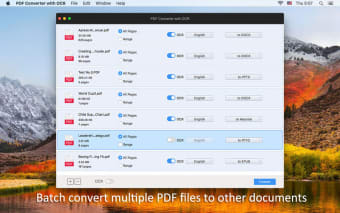
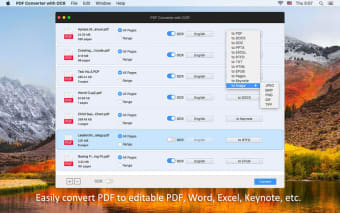
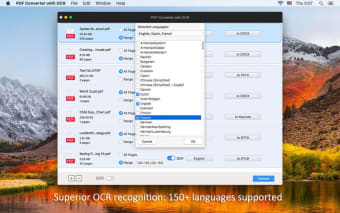
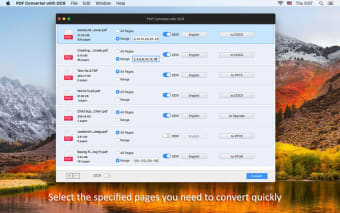
Having scanned documents is good for keeping the data safe, however those documents are not much better than still having a draw full of paper when it comes to searching. To the computer, it's just a big image. PDF Converter with OCR can help with that by converting those "flat" PDF documents into something searchable by deciphering text within the document. The result can be converted to a searchable PDF or a number of other popular documents, such as DOC, EPUB, HTML, TXT, and more. The app can work with encrypted documents, and supports over one hundred and fifty languages. Other features like batch conversion and drag and drop functionality round out a comprehensive feature set.

A Very Good Utility

Even at its premium price point, it's hard to fault PDF Converter with OCR. Some things to note are that it does not automatically detect languages, you have to tell it which language to use, and there's no function to extract individual elements, such as an image. But all in all, this is a very good app.
  • Pros

    • Works with encrypted PDFs
    • Supports over 150 languages
    • Exports to many popular formats
    • Batch conversion
  • Cons

    • Does not automatically detect language
    • Conversion formatting not always consistent
    • Does not support extraction of individual elements
    • Requires OS X 10.10 or later
 0/4

App specs

Program available in other languages


User reviews about PDF Converter with OCR

Have you tried PDF Converter with OCR? Be the first to leave your opinion!

Add review

You may also like

Explore Apps

Latest articles

Laws concerning the use of this software vary from country to country. We do not encourage or condone the use of this program if it is in violation of these laws.
Softonic

Is PDF Converter with OCR safe?

100/100

Score result: Clean

This file passed a comprehensive security scan using VirusTotal technology. It is safe to download.

  • Virus free
  • Spyware free
  • Malware free
  • Verified by Security Partners

    VirusTotal logo

Scan Info

Last scan
Wednesday, February 18, 2026
Scan provider
VirusTotal · Full report

File Integrity

File
PDF_Converter_with_OCR_V7.1.0.dmg
SHA256
73a12bdc30899f97b22200493775b76244c94ef4ecb49ede4f8065d8398c30e5
SHA1
fd271f753d4f804b5a483b8c9359ae0d9c4c17a7

Softonic security commitment

PDF Converter with OCR has been thoroughly scanned by our advanced security systems and verified by industry-leading partners. This file comes from the official developer and has passed all our security checks, showing no signs of viruses, malware, or spyware. For more information, visit our Security and Trust Center